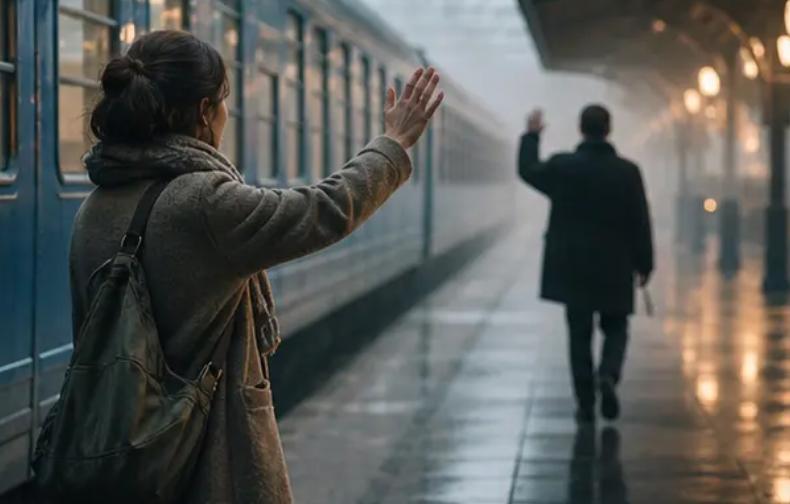
A strong emotional video does more than show what happens. It shows how an event changes a person. Text to video tools let you describe those changes in words and turn them into moving scenes.
The best results come from writing prompts around behavior, setting, timing, camera direction, sound, and emotional progression. This guide explains how to build those elements into a story that feels natural rather than forced.
Why do some AI-generated stories feel emotional while others feel flat?
Emotional storytelling depends on context. A prompt that only says a character is sad gives a video model very little to work with.
Compare these two descriptions:
A woman is sad after losing someone she loves.
That explains the emotion but gives almost no visual direction.
A stronger version describes what the viewer can actually see:
A woman sits at the kitchen table after midnight. An untouched cup of tea rests beside her. She reaches for her phone, opens an old conversation, reads the last message, then locks the screen without replying. She stays still for several seconds while rain taps against the window.
The second description gives the model physical actions, objects, timing, and atmosphere.
It also leaves room for the viewer to understand the emotion without having it announced directly.
What should an emotional scene show?
Focus on visible behavior rather than labels.
Useful details include:
- Facial expression
- Hand movement
- Body posture
- Eye direction
- Distance between characters
- Changes in movement
- Objects connected to the character
- Lighting and environment
- Pauses between actions
- Reactions to dialogue
A character who keeps looking at an empty chair tells a different story from someone who openly cries. Both can represent grief, but they create different emotional experiences.
How should you build the emotional arc before writing the prompt?
Start with the character’s emotional change.
Do not begin by thinking about camera angles or visual effects. Decide what the character feels at the beginning, what happens to change that state, and where the scene ends.
A simple emotional arc can follow this pattern:
Starting state → Trigger → Reaction → Internal struggle → Change
For example:
Starting state: A young man feels confident about an upcoming interview.
Trigger: He receives an email saying the position has been given to another candidate.
Reaction: He reads the message twice and stops typing.
Internal struggle: He considers calling the company but realizes he has nothing left to say.
Change: He closes the laptop, gets dressed, and leaves the apartment for a walk.
The ending does not need to be cheerful. The character simply needs to reach a different emotional state.
That small change gives the scene a sense of progression.
How can small actions make an AI video feel more realistic?
Small actions give characters something believable to do.
Instead of writing:
The father feels heartbroken.
Describe his behavior:
The father places his daughter’s old school photograph on the table. He straightens it twice even though it is already straight. He reaches toward it, stops, and pulls his hand back.
The emotional meaning comes from the behavior.
This technique works particularly well for scenes involving grief, regret, loneliness, fear, affection, embarrassment, and relief.
Objects can also carry emotional meaning. A packed suitcase, an old photograph, a child’s toy, a ringing phone, or an unopened letter can become part of the story without requiring lengthy dialogue.
How does pacing change the feeling of a scene?
Pacing controls how much time the viewer has to process an event.
A fast sequence can communicate panic or confusion. A slower sequence gives the viewer time to notice expressions, gestures, and changes in mood.
When writing your prompt, specify how the scene should progress.
For a tense moment, you could write:
Quick cuts between the character’s face, the locked door, and the phone vibrating on the table. The character moves quickly and checks the hallway several times.
For a reflective scene:
Use long uninterrupted shots. Allow several seconds between movements. The character sits quietly before looking toward the window.
The subject can remain the same while the emotional effect changes completely.
How can silence make a generated scene more powerful?
Silence gives viewers room to interpret what they see.
A conversation does not need dialogue in every shot. A character can read a message, look at another person, hesitate, and walk away without saying anything.
When silence matters, describe it directly in the prompt.
For example:
The two friends sit across from each other at a small café table. Neither speaks. One looks down at his hands while the other waits for an answer. The room remains quiet except for distant dishes and soft background movement.
This creates a different experience from:
Two friends argue about their relationship.
The first version gives the model physical behavior and atmosphere. The second only provides a general situation.
How do you write dialogue that carries emotion?
Dialogue should not explain everything the character feels.
People rarely say exactly what is happening inside their minds. Emotional dialogue works better when the spoken words and physical behavior tell slightly different parts of the story.
For example:
“I’m fine.”
The character says it quietly while avoiding eye contact and folding the same piece of paper several times.
The words suggest one thing. The behavior suggests another.
You can guide this relationship in your prompt by describing:
- Speaking speed
- Volume
- Hesitation
- Pauses
- Eye contact
- Facial reaction
- Body movement
- Emotional tension beneath the words
This gives the scene more depth without filling it with exposition.
What should you include in a text-to-video prompt?
A useful emotional prompt can contain several layers.
1. Character
Describe who is in the scene and what they look like.
Include age range, clothing, physical appearance, and other details needed for visual consistency.
2. Location
Give the model a specific environment.
A bedroom at 2 a.m. creates a different mood from a crowded train station during rush hour.
3. Situation
Explain what is happening at that exact moment.
Avoid broad story summaries. Describe the scene you want to see.
4. Emotional state
Explain the feeling through behavior and expression rather than relying only on emotion labels.
5. Action
Tell the character what they do.
Actions give the generated footage a sequence to follow.
6. Camera direction
Specify the framing and movement when they matter.
Examples include:
- Close-up on the face
- Wide shot of the room
- Slow camera movement
- Handheld camera
- Over-the-shoulder shot
- Static shot
- Tracking shot
7. Lighting
Lighting affects the emotional tone of the scene.
You can describe morning sunlight, dim interior lighting, streetlights through a window, candlelight, or harsh fluorescent lighting.
8. Sound
Add dialogue, ambient sound, silence, or music direction when the platform supports it.
These details work together to give the generated scene a clear visual and emotional identity.
What is a good example of an emotional text-to-video prompt?
Here is an original example built around quiet regret:
A middle-aged man returns to his childhood home after many years away. He enters an old living room carrying a small cardboard box. Dusty afternoon sunlight passes through thin curtains. He places the box beside an empty armchair and notices a framed family photograph on a shelf. He picks it up with both hands and studies it silently. His expression changes from calm recognition to restrained sadness. He wipes dust from the frame with his sleeve, sits in the empty chair, and looks toward the doorway as if expecting someone to enter. Hold the final shot for several seconds. Natural facial expressions, restrained acting, realistic body movement, soft room ambience, slow camera movement, cinematic composition.
Notice that the prompt does not simply say “make it emotional.”
It creates emotion through the character’s actions and surroundings.
How can you create emotional contrast between scenes?
Contrast keeps a story from feeling emotionally flat.
A video can move from warmth to loss, confidence to fear, isolation to connection, or tension to relief.
Consider a three-scene structure.
Scene 1: A mother prepares breakfast while her child gets ready for school. The room is bright and busy.
Scene 2: The same kitchen is empty later that day. The untouched breakfast remains on the table.
Scene 3: The mother returns home and places the child’s school bag beside the door.
The objects and location remain connected. The emotional meaning changes because the circumstances change.
This technique also helps create continuity between generated scenes.
How do you maintain character consistency across multiple scenes?
Character consistency becomes harder when a story contains several shots or locations.
Give the character a fixed visual description and repeat the relevant details in each prompt.
For example:
A 32-year-old woman with shoulder-length dark brown hair, a small silver necklace, a beige wool coat, and black boots.
If the story moves from a street to a café, keep those identifying details consistent.
You should also keep track of:
- Clothing
- Hair style
- Age
- Accessories
- Physical features
- Time of day
- Weather
- Location
- Emotional state
A reference image can also help when the text-to-video platform supports image references.
How can camera movement support emotional storytelling?
Camera movement should serve the scene instead of competing with it.
A close-up works well when a facial reaction matters. A wide shot can make a character look isolated within a large environment.
Try matching camera behavior to the character’s emotional state.
For anxiety: Use closer framing and restrained handheld movement.
For loneliness: Use wider framing with more empty space around the character.
For intimacy: Use a close or medium shot with slow movement.
For realization: Begin with a wider view and move toward the character as their expression changes.
For calm reflection: Use a stable shot with minimal camera movement.
The camera becomes part of the storytelling rather than a decoration.
How can lighting shape the emotional tone?
Lighting can change how the same location feels.
A bedroom lit by warm morning sunlight can feel safe and familiar. The same room under a single overhead light at night can feel lonely.
When writing your prompt, describe both the light source and its effect.
For example:
Cool streetlight enters through the apartment window, leaving most of the room in shadow while the character sits alone near the glass.
This gives the video model a clearer visual target than simply asking for “sad lighting.”
How should you use music and ambient sound?
Sound should support what the viewer sees.
A quiet emotional scene does not always need dramatic music. Room tone, rain, footsteps, traffic, breathing, or a clock can make a scene feel more grounded.
Think about three sound layers:
Dialogue: What the characters say.
Ambient sound: What exists naturally in the location.
Music: The emotional layer added underneath the scene.
For a tense scene, a phone vibrating on a table can be more effective than a loud soundtrack.
For a reflective scene, soft environmental sound can leave space for the character’s expression.
How can Dreamina help turn an emotional idea into video?
Dreamina provides AI creation tools that can turn written descriptions into visual content. Its text-to-video workflow lets you start with a written scene instead of filming it manually.
The process works best when the prompt gives the generator enough information about the subject, action, setting, visual style, and timing.
You can also use reference material when you need a particular visual direction. This helps when a story depends on a consistent character, location, or overall look.
The goal is not to write the longest prompt possible. The goal is to give each sentence a clear job.
How do you create an emotional video step by step?
Step 1: Decide what the viewer should feel
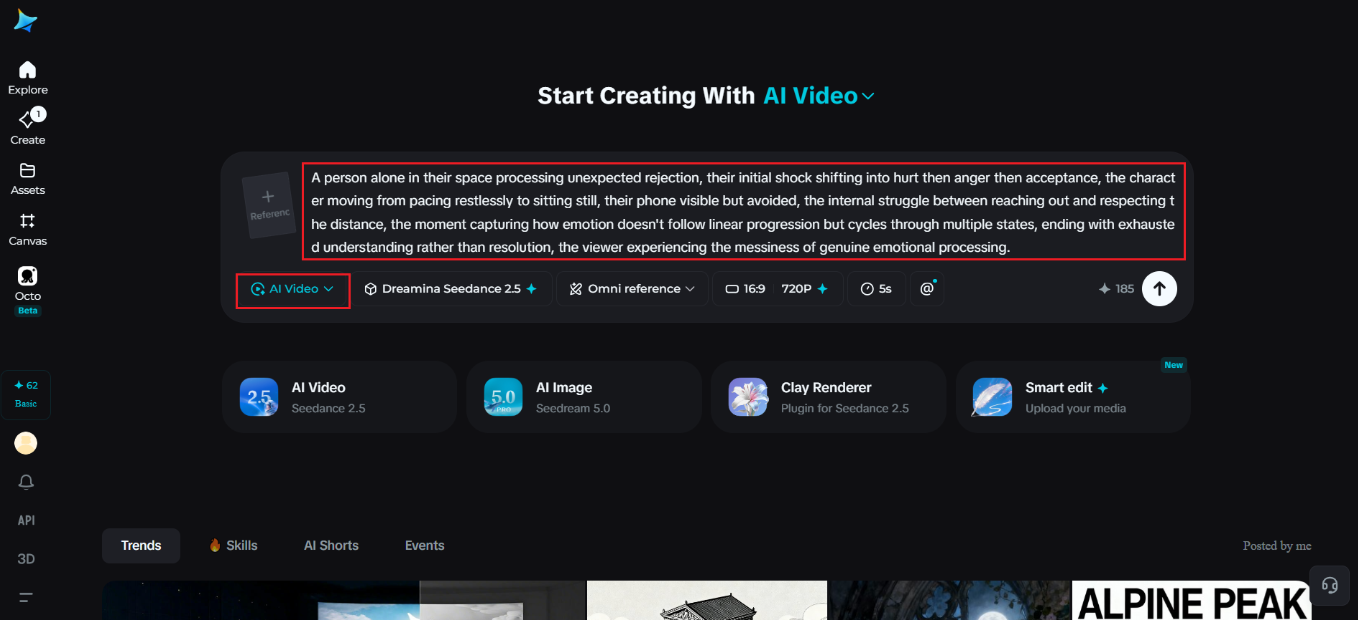
Choose one main emotional response.
Examples include:
- Nostalgia
- Relief
- Fear
- Grief
- Hope
- Regret
- Joy
- Loneliness
- Affection
- Surprise
Do not try to make one short scene communicate every emotion at once.
Step 2: Give the character a reason to feel it
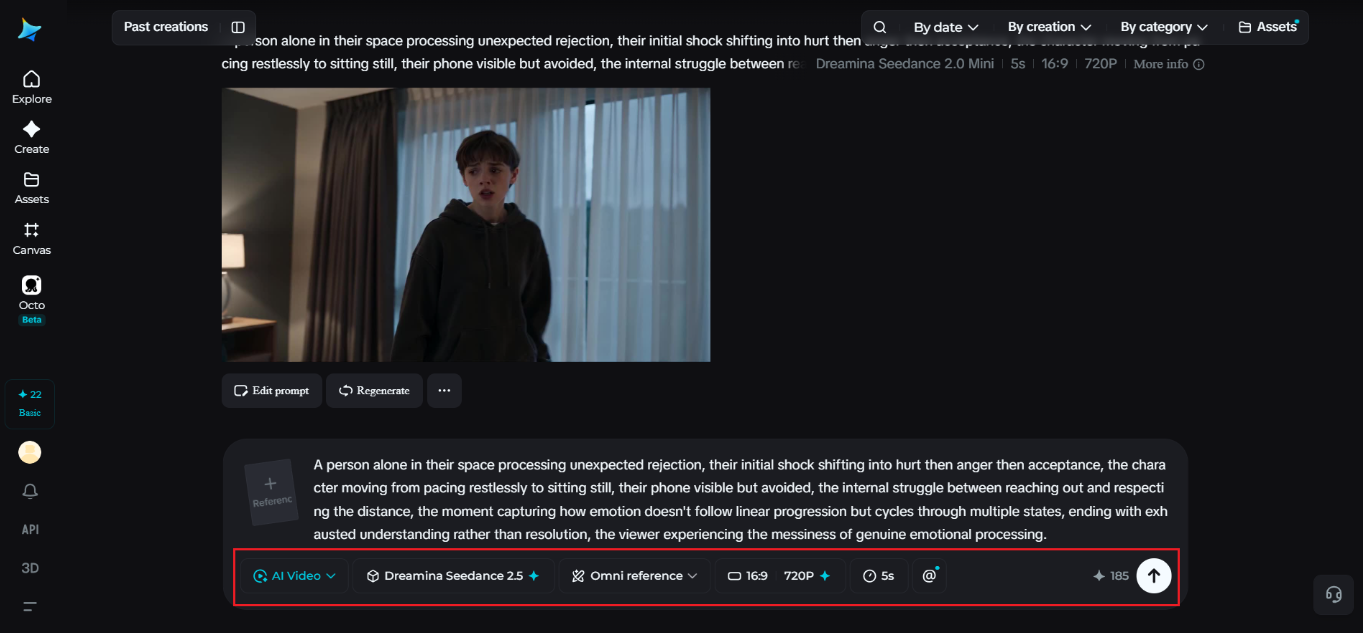
Emotion needs a cause.
Write down what happened immediately before the scene begins. Then decide how the character reacts.
Step 3: Turn the emotion into visible behavior
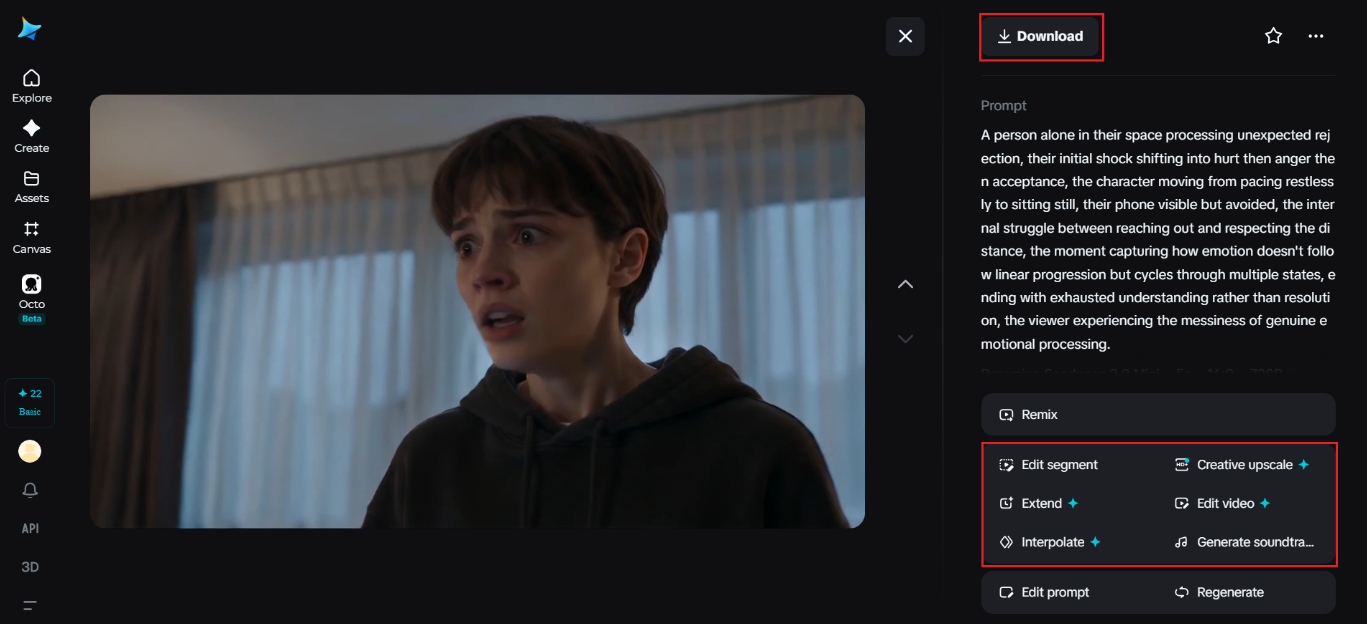
Replace abstract statements with actions.
Instead of:
He feels nervous.
Write:
He checks the clock, rubs his palms together, starts typing a message, deletes it, and puts the phone face down.
Step 4: Build the setting around the mood
Choose a location that supports the story.
A hospital hallway, empty classroom, crowded station, family kitchen, quiet park, or small apartment can each create a different emotional context.
Step 5: Add camera and lighting directions
Tell the model what deserves attention.
Use close-ups for important reactions. Use wide shots when the surroundings tell part of the story.
Step 6: Add dialogue only where it helps
Do not make characters explain emotions that their actions already communicate.
Step 7: Generate and inspect the result
Watch the entire clip before deciding what needs to change.
Look for facial movement, body position, pacing, continuity, unwanted objects, awkward gestures, and changes in character appearance.
Step 8: Refine one problem at a time
If the character’s expression is wrong, change the expression direction.
If the camera feels too active, simplify the camera instruction.
If the scene moves too quickly, describe longer pauses and slower actions.
Changing several unrelated elements at once makes it harder to identify what fixed the problem.
What mistakes make AI-generated emotional stories feel artificial?
Several prompt habits can weaken emotional scenes.
Telling the model the emotion without showing it
“Make the character extremely sad” does not explain how sadness should appear.
Give the character behavior instead.
Adding too many dramatic effects
Heavy music, extreme camera movement, crying, rain, darkness, and dramatic dialogue can all appear in the same prompt. The result can feel exaggerated.
Choose a small number of elements that support the story.
Giving characters too many actions
A short video cannot communicate ten major actions clearly.
Give the scene a simple sequence with enough time for each action to register.
Changing the character description
Inconsistent descriptions can produce changes in clothing, hair, age, or appearance between scenes.
Keep important visual traits fixed.
Writing an entire screenplay into one prompt
A long story is better divided into individual scenes.
Each scene can then have its own location, action, camera direction, and emotional purpose.
How can you turn one emotional idea into several video scenes?
Start with one central event and break it into visual beats.
For example, the idea is a woman receives news that changes her plans.
Scene 1: She waits at home while watching the clock.
Scene 2: Her phone receives a message.
Scene 3: She reads it without moving.
Scene 4: She puts the phone down and walks toward the window.
Scene 5: She looks outside and slowly smiles.
Each scene has one main purpose.
This approach also makes editing easier because every clip has a clear place in the story.
How do you know if the final video feels emotionally believable?
Watch the video without reading your original prompt.
Ask whether the character’s behavior makes sense on its own.
Check whether the emotional change is visible. Look at the pauses between actions. Watch the character’s face during dialogue. Check whether the environment supports the scene.
A good emotional sequence does not need to tell viewers what to feel. The visual details give them enough information to reach that feeling themselves.
FAQ
Q: Can text-to-video create emotional scenes without dialogue?
A: Yes, text-to-video can create emotional scenes through movement, facial expression, setting, and pacing. A character can communicate grief or relief through behavior alone. The scene should describe visible actions instead of relying on spoken explanations. Dialogue becomes useful when the story requires information that cannot be shown visually.
Q: How long should an emotional AI video be?
A: The right length depends on how much emotional progression the story needs. A single reaction can work in a short clip, while a character change needs several connected scenes. Keep each generated segment focused on one main event. Longer stories work better when divided into multiple clips.
Q: What should I put in an emotional video prompt?
A: Include the character, setting, situation, visible behavior, emotional progression, camera direction, lighting, and sound when relevant. These details tell the video generator what the audience should see rather than only naming an emotion. Keep the number of actions manageable within the requested clip length.
Q: Can AI-generated characters show subtle emotions?
A: Yes, generated characters can portray subtle emotions through facial expressions and body movement. Prompt details such as avoiding eye contact, pausing before speaking, or changing posture give the scene more direction. Results still depend on the generation model and the complexity of the requested action.
Q: Should every emotional video use sad music?
A: No, sad music is not required for an emotional video. Ambient sound and silence can create a stronger effect when the scene is quiet. Music should match the mood and should not distract from important dialogue or character reactions.
Q: Can I create an emotional story from a single image?
A: Yes, an image can provide the visual starting point for an AI-generated scene when the platform supports image references. The written prompt can then describe movement, expression, camera behavior, and environmental changes. The source image should contain enough visual information for the intended character or setting.
Final thoughts
Emotional AI video starts with a clear human idea, not a complicated prompt.
Decide what changes for the character. Give that change a cause. Then describe the small actions that allow viewers to see it.
Use setting, silence, lighting, camera movement, sound, and pacing to support those actions. Keep each scene focused on one emotional beat.
That approach turns a simple written concept into a story with visible character development instead of a collection of disconnected AI-generated shots.